Orbit documentation
Everything about using, configuring and contributing to Orbit, the macOS launcher with a built-in assistant. New here? Start with Getting started. Looking for the overview? Head back to the project README.
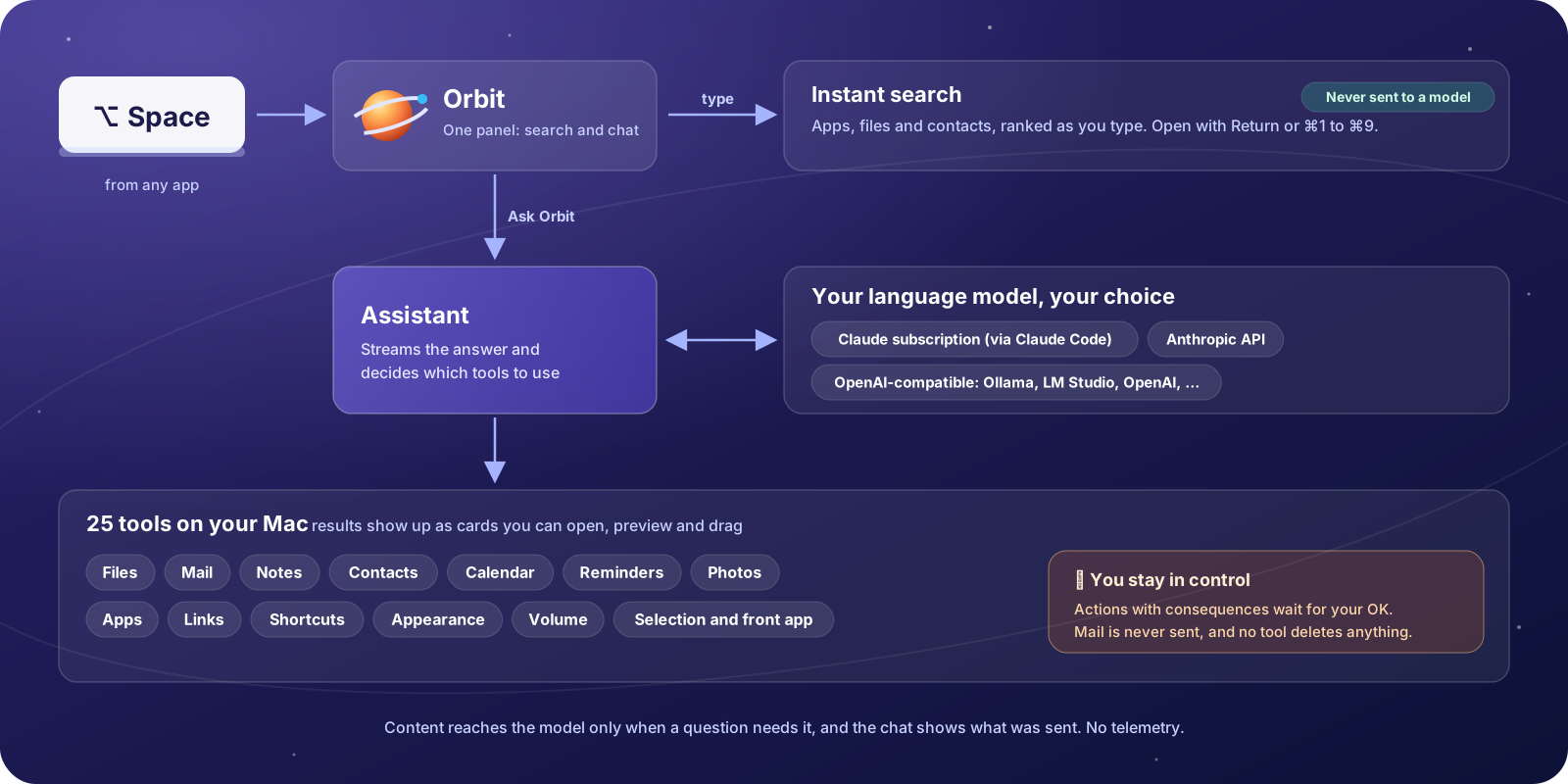
Where to start
| I want to… | Read |
|---|---|
| try Orbit on my Mac | Getting started, then the User guide |
| use my Claude subscription, an API key or a local model | Choosing a language model |
| know what Orbit can do with my mail, files and calendar | Tools reference |
| know what leaves my Mac and what Orbit may access | Privacy and Permissions |
| fix something that doesn't work | Troubleshooting and Known limitations |
| work without a mouse or with VoiceOver | Keyboard shortcuts and Accessibility |
| build Orbit, fix a bug or add a tool | Development, Architecture and The agent |
| review Orbit's security | Security model and SECURITY.md |
Using Orbit
| Page | What you'll find |
|---|---|
| Getting started | Requirements, installing or building Orbit, the setup assistant, your first questions, updating and uninstalling |
| User guide | The panel, instant search, chatting with the assistant, result cards, confirmation cards, context chips, chat history, Settings |
| Keyboard shortcuts | Every key for the panel, cards, confirmations, notices, Settings and the setup assistant |
| Choosing a language model | The Claude subscription (via Claude Code), the Anthropic API and OpenAI-compatible servers such as Ollama and LM Studio |
| Tools reference | All 25 tools: parameters, limits, what needs your confirmation and what the model receives |
| Permissions | Each macOS permission Orbit can use, why, and how Orbit asks for it |
| Privacy | What is sent to the model and when, what is stored where, logs, deleting your data |
| Accessibility | VoiceOver, keyboard-only use and the display settings Orbit follows |
| Troubleshooting | What each notice means and what helps, common problems, logs, FAQ |
| Known limitations | What Orbit doesn't do (yet), area by area |
Contributing to Orbit
| Page | What you'll find |
|---|---|
| Architecture | Components and data flow, module map, app lifecycle, UI, instant search, storage, permissions, concurrency |
| The agent | The agent loop, the tool protocol and registry, risk levels and confirmations, the system prompt, adding a new tool |
| LLM providers | The provider abstraction, the Anthropic and OpenAI wire formats, streaming, retries, errors, the Claude Code runtime and its MCP bridge |
| Security model | Trust boundaries, threats and the defenses against them, mapped to the code |
| Development | Toolchain and build scripts, project layout, debug builds, FakeLLMServer, orbitctl, invented test data |
| Testing | Unit tests, mocks and fixtures, the opt-in suites and the rules every test follows |
| Manual acceptance checks | What to check by hand on a real Mac before a release |
| Localization | How Orbit picks its language, String Catalogs, the OrbitStrings tool and the rules for user-visible text |
| Releasing | Versioning, universal builds, code signing, notarization and the release checklist |
| Performance | Targets, measurements and how to measure |
Project files: CONTRIBUTING.md · SECURITY.md · CHANGELOG.md · LICENSE (MIT)