Choosing a language model
Orbit's assistant needs a language model. This page compares the three kinds of provider Orbit supports, explains how to set up each one, and covers Test Connection, switching providers and where the settings are kept. Instant search never uses a model; only questions you ask Orbit do.
The three providers at a glance
You choose the provider in the setup's Language Model step or in Settings → Model → Provider.
| Claude subscription (via Claude Code) | Anthropic API | OpenAI-compatible | |
|---|---|---|---|
| What you need | A Claude Pro or Max plan, plus the Claude desktop app (which bundles Claude Code) or a Claude Code installation, signed in | An API key from the Anthropic Console | A server with a Chat Completions API: Ollama or LM Studio on your Mac, another machine, or a hosted service such as OpenAI |
| Cost model | Counts toward your subscription's usage limits; no per-request bill | Pay per token on your Anthropic account | Free on your own hardware; per-token pricing with hosted services |
| Where requests go | Orbit starts Claude Code on your Mac; Claude Code connects to Anthropic. Orbit itself makes no internet connection | Orbit connects to api.anthropic.com, or to the Anthropic-compatible server you enter |
Orbit connects to the server address you enter (default http://localhost:11434/v1, Ollama on this Mac) |
| Tool support | All of Orbit's tools, through a local bridge (Claude Code runs the tool loop) | All of Orbit's tools | All of Orbit's tools, if the model supports tool calling (for example gpt-oss or qwen3) |
| Setup effort | Lowest: install the Claude app, sign in once in the browser | Paste a key | Install and start a server, download a model, enter its address and name |
On the first launch, Orbit preselects the Claude subscription when it finds Claude Code in one of its standard locations (including the Claude app's own copy); otherwise it preselects the Anthropic API.
Whichever provider you use, the chat notes what personal content was sent to it, for example "3 emails sent to Claude". The note names Claude for the Claude subscription and Anthropic's API, the server's host name for other servers, and "the local model" for a server on this Mac. See Privacy.
Claude subscription via Claude Code
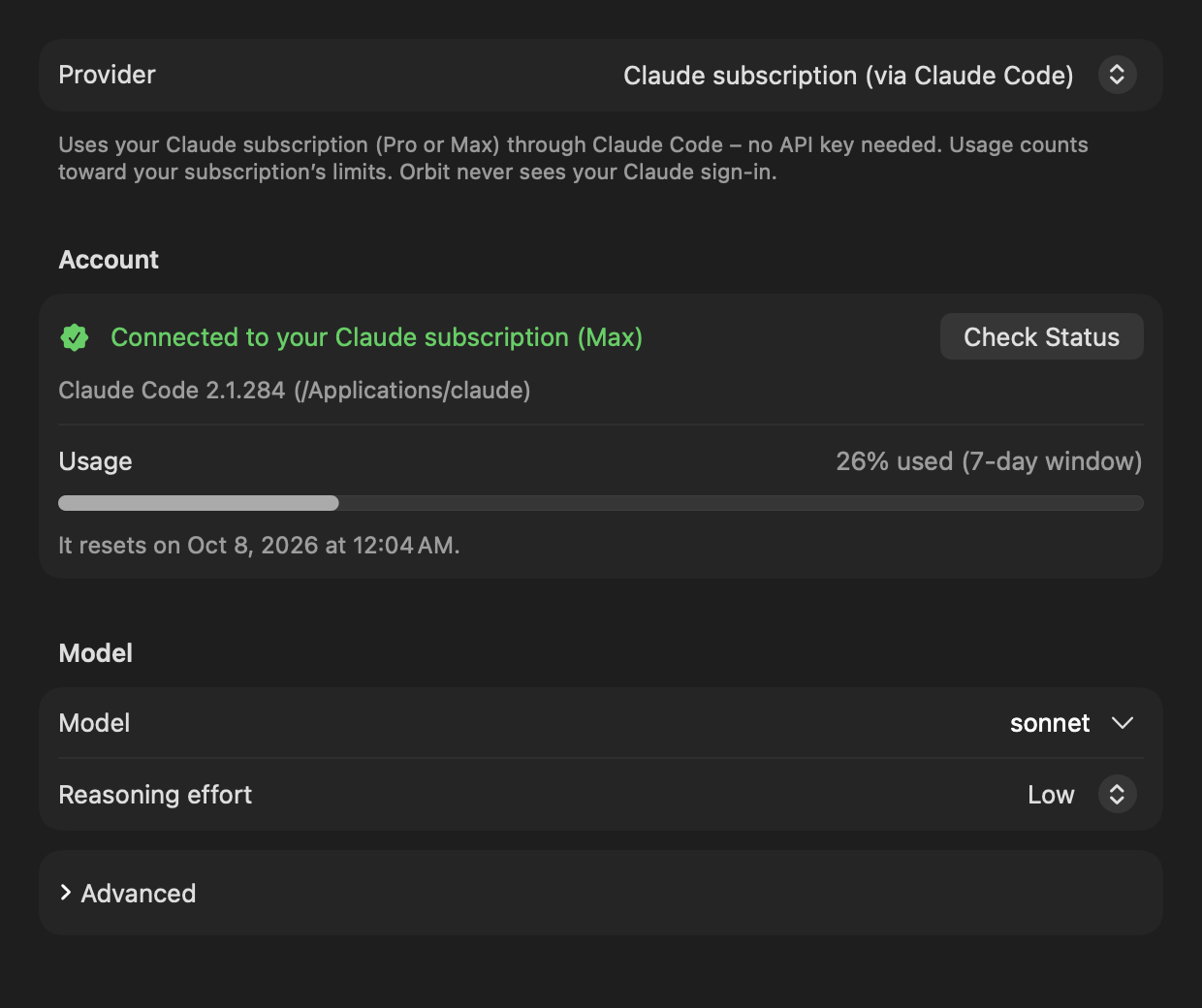
The provider Claude subscription (via Claude Code) runs Orbit on your Claude Pro or Max plan instead of an API key: "Uses your Claude subscription (Pro or Max) through Claude Code, no API key needed. Usage counts toward your subscription’s limits. Orbit never sees your Claude sign-in."
Orbit does not talk to Anthropic itself. It starts the locally installed, unmodified Claude Code as a child process, and Claude Code uses its own sign-in. Orbit never reads, stores or forwards Claude credentials.
Important
Orbit is an independent project and is not affiliated with or endorsed by Anthropic. You sign in with your own Claude account through Anthropic's own sign-in flow; Orbit never touches your credentials and runs Claude Code unmodified. You are responsible for making sure that your use complies with Anthropic's terms for your plan; see Claude Code: legal and compliance. If you are unsure, use the Anthropic API or a local model through an OpenAI-compatible server.
Requirements
- A Claude Pro or Max subscription.
- Claude Code, in one of two ways:
- the Claude desktop app (from claude.ai/download), which keeps its own copy of Claude Code, or
- a Claude Code installation you set up in Terminal.
- Claude Code signed in with your Claude account (see Signing in).
How Orbit finds Claude Code
Orbit looks for the claude program in this order and uses the first one that is an executable file (an absolute
path; symbolic links are followed):
- The Program path from Settings → Model → Advanced (see Advanced settings), with
~expanded. If the path is not usable, Orbit goes on with the next steps. - The copy the Claude desktop app keeps in
~/Library/Application Support/Claude/claude-code/<version>/(the program isclaude.app/Contents/MacOS/claudeinside it). The app keeps one folder per version. Orbit prefers versions whose download the app has verified, and among them the newest verified version; unverified versions come after all verified ones, newest first. - The standard install locations, in this order:
~/.local/bin/claude,~/.claude/local/claude,/opt/homebrew/bin/claude,/usr/local/bin/claude. - A login shell:
/bin/zsh -lc 'command -v claude'with a minimal environment, which also finds installs through version managers. It may take at most 5 seconds. Orbit remembers the answer and checks before each use that the file is still there.
Orbit repeats this lookup for every request, so when the Claude app updates its copy of Claude Code, Orbit picks up the new version without a restart.
Signing in
Settings → Model shows whether Claude Code is installed and signed in. If it is not signed in, click
Sign In…: Orbit runs claude auth login --claudeai, which opens Anthropic's own sign-in in your browser.
Orbit never sees your credentials.
- While the sign-in runs, Settings shows "Signing in through your browser…" and Cancel.
- The sign-in may take up to 10 minutes; after that it counts as not completed.
- If it fails or times out: "Sign-in was not completed. Please try again."
- Sign In… also appears in the setup's Language Model step and on the chat notice "Claude Code is not signed in. …" (there, Orbit sends your request again by itself after a successful sign-in; see Troubleshooting).
- All three places share one sign-in: starting it twice opens only one browser flow.
- A sign-in that is still running ends when Orbit quits.
- If the browser does not open, sign in once in Terminal with
claude auth login.
Status, plan and usage
The Account section reads the status with two commands that spend no tokens: claude --version and
claude auth status --json (each may take up to 20 seconds). Of the status, Orbit reads only the fields
loggedIn, authMethod and subscriptionType, never the account's e-mail address or organization.
| What you see | Meaning |
|---|---|
| "Checking Claude Code…" | The status is being read. |
| "Connected to your Claude subscription (Max)" | Signed in; the plan comes from subscriptionType (for example Pro or Max). Without a plan: "Connected to your Claude account". |
| "Claude Code is not signed in" | Installed but signed out. Sign In… is offered. |
| "Claude Code was not found" | No usable claude program. "Install the Claude app from claude.ai/download or Claude Code in Terminal, then click “Check Status”." |
| "Claude Code’s status could not be checked" | claude auth status failed or answered something Orbit does not understand. |
The line under the status names the Claude Code Orbit uses: "Claude Code 2.1.284 from the Claude app", or the version with its path, for example "Claude Code 2.1.251 (~/.local/bin/claude)". If Claude Code is signed in with an Anthropic Console account instead of a subscription, it adds: "Claude Code is not signed in with a Claude subscription; usage is billed through the Anthropic Console."
Check Status reads the status again.
Usage. Once Claude Code has reported your usage during a request, the Usage row shows it, for example "26% used (7-day window)", with a bar (orange from 80 %) and the reset time ("It resets on Sep 29, 2026 at 6:00 PM."). The windows are the 5-hour window, the 7-day window, the 7-day window for Opus and the 7-day window for Sonnet. The text turns red when the limit is reached.
Usage warnings and the usage limit
- Warnings at 80 % and 95 %. When a usage window reaches 80 % and again at 95 %, the chat shows an info notice, for example "You have used 82% of your Claude usage limit (5-hour window). It resets on Sep 29, 2026 at 6:00 PM." Each threshold is shown once per window while Orbit runs. (Claude Code itself flags usage much earlier, for example at 26 %; Orbit does not warn for that.)
- Limit reached. When the subscription's limit stops a request, the notice says: "Your Claude subscription’s usage limit has been reached. It resets on Oct 5, 2026 at 3:00 PM." with Try Again. A usage warning that the same request showed is removed, so only one notice remains.
- Where the reset time comes from. Only from Claude Code's rejection of that request, never from an earlier warning, which may be about another window (for example the week's while the five hours ran out). If Claude Code reports the limit only as text, Orbit reads a time of day such as "resets 3pm (Europe/Berlin)" (in the named time zone, otherwise your Mac's), but not a date such as "resets Oct 3"; the notice then only says that the limit has been reached. See Known limitations.
Models
The Model field takes a Claude Code model alias or a full model ID. Its suggestions menu offers:
| Alias | Shown as |
|---|---|
sonnet |
Sonnet: balanced (default) |
opus |
Opus: most capable |
haiku |
Haiku: fastest |
The default is sonnet, which Claude Code resolves to its current Sonnet model. Orbit passes the value to Claude Code
as --model=<value> and checks only its form (1 to 128 characters: letters, digits and . _ : @ [ ] -, starting with
a letter or digit). If your plan does not include the model, the notice says: "Your Claude subscription does not
include the selected model. Choose a different model in Settings."
Reasoning effort is passed as --effort low|medium|high; Automatic passes nothing and uses Claude Code's
default. See Reasoning effort.
Advanced settings
Under Advanced, Program path sets the claude program to use. Leave it empty ("Detect automatically") to find
Claude Code automatically "(from the Claude app or an installation in Terminal)". Press Return in the field to check
the status with the new path.
How Orbit isolates Claude Code
Claude Code runs as a plain chat engine. It gets none of its built-in tools, skills, slash commands, plugins, hooks, memory, settings files or saved sessions, and no messages from other Claude Code sessions.
Command-line flags for every chat process:
| Flag | Effect |
|---|---|
-p, --input-format stream-json, --output-format stream-json, --include-partial-messages, --verbose |
Non-interactive streaming chat over standard input and output |
--model=<model> and, unless Automatic, --effort <level> |
The model and reasoning effort from Settings |
--tools "" |
No built-in tools (no shell, no file editing, no web access of its own) |
--disable-slash-commands |
No slash commands or skills |
--strict-mcp-config |
Only the MCP servers Orbit passes, no others from your configuration |
--setting-sources "" |
No user, project or local settings files |
--no-session-persistence |
Sessions are not saved to disk |
--settings {"crossSessionInbound":"refuse"} |
Other Claude Code sessions cannot send it messages |
--system-prompt-file <file> |
Orbit's system prompt |
--mcp-config <file> and --allowedTools mcp__orbit__* |
Orbit's tool bridge as the only MCP server, and only its tools (only when tools are offered) |
Working folder: an otherwise empty folder, ~/Library/Application Support/Orbit/ClaudeCode, readable only by you.
Environment: Claude Code does not inherit Orbit's environment. Only these variables are passed on, when set:
PATH, HOME, USER, LOGNAME, LANG, LC_ALL, LC_CTYPE, TMPDIR, and for network configuration
HTTPS_PROXY, https_proxy, HTTP_PROXY, http_proxy, NO_PROXY, no_proxy and NODE_EXTRA_CA_CERTS.
Everything else is dropped, in particular every ANTHROPIC_* variable (API keys, base URLs) and every
CLAUDE_CODE_* or CLAUDECODE variable from Orbit's own environment. PATH gets the program's own folder and
/usr/bin:/bin:/usr/sbin:/sbin added; LANG defaults to en_US.UTF-8.
Orbit then sets these switches:
| Variable | Value | Effect |
|---|---|---|
CLAUDE_CODE_DISABLE_AUTO_MEMORY |
1 |
No automatic memory |
CLAUDE_CODE_DISABLE_BUNDLED_SKILLS |
1 |
No bundled skills |
CLAUDE_CODE_DISABLE_EXPLORE_PLAN_AGENTS |
1 |
No built-in sub-agents |
CLAUDE_CODE_DISABLE_NONESSENTIAL_TRAFFIC |
1 |
No non-essential network traffic |
DISABLE_TELEMETRY |
1 |
No telemetry |
DISABLE_ERROR_REPORTING |
1 |
No error reporting |
DISABLE_AUTOUPDATER |
1 |
No automatic updates from Orbit's processes |
MCP_TOOL_TIMEOUT |
3600000 |
A tool call may wait up to 60 minutes (for example for you to confirm a card) |
CLAUDE_CODE_MCP_AUTO_BACKGROUND_MS |
0 |
Long tool calls are never moved to the background |
One process per chat
- The Claude Code process of the current chat is reused for follow-up questions: it remembers the conversation, so Orbit sends only your new message.
- The process is replaced when you send a message in another chat (a new chat or a restored one), when the model, reasoning effort, system prompt, tools or program path change, and after a request fails. It ends after 15 minutes without a request and when Orbit quits.
- A new process for an existing chat (for example after a restart of Orbit, the idle timeout or a settings change) first receives the earlier conversation as a compact, text-only transcript (up to 60,000 characters; the newest messages are kept).
- Escape interrupts the running answer at once. If Claude Code does not finish the interrupted turn within 10 seconds, or answers that it cannot interrupt, Orbit ends the process; the next request starts a new one with the transcript.
How tools work with Claude Code
Claude Code runs the tool loop itself. It calls Orbit's tools through a small MCP server that Orbit starts for each process:
- Streamable HTTP on
127.0.0.1at a random port, path/mcp. - A random 256-bit bearer token per process; requests without it are refused.
- Only the hosts
127.0.0.1andlocalhostat that port; requests from browsers (with anOriginheader) are refused. - The tools appear to Claude Code as
mcp__orbit__<tool name>.
Every call goes through the same checks, confirmation cards, status rows and the limit of 15 tool calls per request as with the API providers, and the chat history is recorded the same way, which is why you can switch providers within a chat. Technical details: LLM providers.
Temporary files
For each process Orbit writes two temporary files into the working folder, readable only by you (the folder is readable only by you as well):
system-prompt-<id>.txt: the system prompt.mcp-config-<id>.json: the MCP configuration with the bridge's token. It is deleted as soon as Claude Code has connected.
Both are deleted when the process ends, and at the latest when Orbit quits. Leftovers from a process that did not end cleanly are removed when the next process starts, once they are older than 10 minutes.
Anthropic API
The provider Anthropic API uses Claude through Anthropic's Messages API with your own API key: "Claude through the Anthropic API. You can get an API key in the Anthropic Console."
The API key
- Create a key in the Anthropic Console.
- Paste it into API key (in the setup or in Settings → Model → Account) and click Save (or press Return).
The key is stored only in your login keychain (labeled "Orbit: anthropic-api-key"), never in a file or in Orbit's settings. The field accepts a new key but never shows the stored one. The row under it says "Saved in keychain" or "No key saved"; Remove deletes the stored key. Test Connection with a typed key saves it when the test succeeds.
The official API always needs a key: without one, a request ends with "No API key is set. Enter it in Settings." before anything is sent.
Models
The Model field defaults to claude-sonnet-5-5. Its suggestions menu offers claude-sonnet-5-5 (default),
claude-opus-5-5 and claude-haiku-4-5; you can type any model ID your account can use. Each response may be up to
32,000 tokens long.
On the official API, Orbit also:
- asks the API to cache the conversation (prompt caching);
- for
claude-sonnet-5-5,claude-opus-5-5,claude-fable-5,claude-fable-5-1andclaude-mythos-5-1, lets the model think adaptively and shows its short progress notes as status lines while it works.
Reasoning effort is sent only to models that support it (the Claude Sonnet 5, Opus 5, Fable and Mythos families,
Claude Opus 4.5 to 4.8 and Claude Sonnet 4.6); other models, such as claude-haiku-4-5, get no effort setting. See
Reasoning effort.
A custom server address
Server address is optional: "Optional. Leave empty for api.anthropic.com, or enter the address of a compatible server, e.g. http://localhost:11434 for Ollama."
- Enter the server's root address. A trailing
/v1or/v1/messagesis removed, sohttp://localhost:11434,http://127.0.0.1:11434andhttp://localhost:11434/v1all work for Ollama's Anthropic-compatible API. - A compatible server may not need a key. If it refuses a request without one, the notice says "No API key is set. Enter it in Settings." (not that a key was rejected).
- Compatible servers get only the plain Messages API: no caching of the whole conversation, no progress notes, and no
reasoning effort for non-Claude models such as
gpt-oss:20b. If such a server rejects an optional part of a request, Orbit sends the request again without it and remembers that for this server and model until Orbit quits. - For a server on this Mac, the chat's note on what was sent names "the local model"; for another server, its host name.
Plain http:// works only for some addresses; see Plain HTTP addresses.
OpenAI-compatible servers
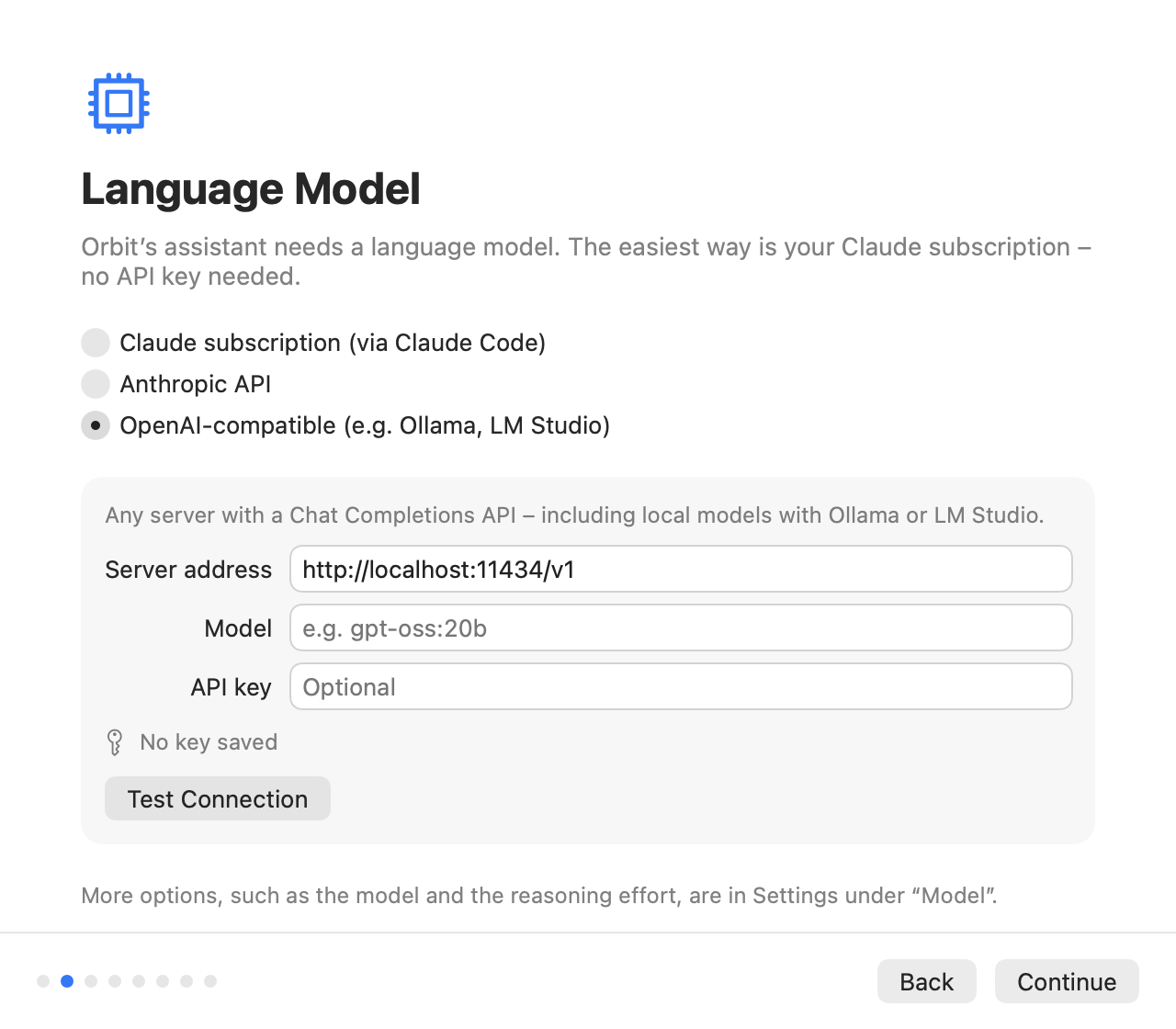
The provider OpenAI-compatible works with "any server with a Chat Completions API, including local models with Ollama or LM Studio", and with OpenAI itself.
Server address
The address must include the API's version path, usually ending in /v1. Orbit adds /chat/completions and
/models itself (a pasted …/chat/completions is trimmed). If the field is empty, Orbit uses
http://localhost:11434/v1.
| Server | Address |
|---|---|
| Ollama on this Mac | http://localhost:11434/v1 |
| LM Studio's local server on this Mac | http://localhost:1234/v1 (start the server in LM Studio first) |
| OpenAI | https://api.openai.com/v1 (needs an API key) |
| Another machine in your network | for example http://192.168.1.20:11434/v1 |
An address without /v1 usually ends with "The server address in Settings is invalid.", because the server answers
that it does not know the route.
Model
Enter the model name exactly as the server knows it, for example gpt-oss:20b or qwen3 for Ollama. A model is
required: without one, Orbit says "No model is set. Enter a model in Settings." When Test Connection looks for the
model in the server's list, Ollama's implicit :latest tag does not matter: llama3 and llama3:latest count as the
same model.
The model must support tool calling. Orbit always offers its tools, so a model without tool support cannot answer: "The model “gemma3:4b” cannot use tools. Choose a model with tool support in Settings, for example gpt-oss or qwen3."
API key
The key is optional: local servers such as Ollama and LM Studio need none ("No key saved (not needed for local servers)"). If you enter one, it is stored only in your login keychain (labeled "Orbit: openai-compatible-api-key") and sent as a bearer token. If a server refuses a request because no key was sent, the notice says "No API key is set. Enter it in Settings." For OpenAI, enter your OpenAI API key.
Reasoning with OpenAI-compatible servers
When Reasoning effort is not Automatic, Orbit sends it as reasoning_effort (low, medium or high). If a
server rejects that field, Orbit sends the request again without it and remembers that for this server and model until
Orbit quits. While the model works through tools, its reasoning is sent back to the server in the field it came in
(models such as gpt-oss expect that); a server that rejects it gets the request again without it.
Reasoning effort
Reasoning effort in Settings → Model controls how thoroughly the model thinks: "Higher is more thorough but slower."
| Setting | Effect |
|---|---|
| Automatic | Sends no setting: the provider's default (for the Claude subscription, Claude Code's default) |
| Low | The default |
| Medium | More thorough |
| High | Most thorough, slowest |
The setting is shared by all providers. How it is sent: --effort for Claude Code, output_config.effort for
supporting Claude models on the Anthropic API, reasoning_effort for OpenAI-compatible servers.
Plain HTTP addresses
Orbit connects with HTTPS, or with plain http:// only to addresses macOS (App Transport Security) allows without
encryption:
- this Mac (
localhost,127.0.0.1,::1), - IP addresses,
.localnames (for examplestudio.local),- names without a dot (for example
gaming-pc).
macOS blocks plain HTTP to other names, such as pc.fritz.box. The Server address field says so right away,
and a request ends with: "Orbit allows unencrypted connections (http://) only to this Mac, to IP addresses and to
.local addresses. Use https:// or the server’s IP address." Use https://, the server's IP address or its .local
name instead.
For plain HTTP to an IP address outside this Mac and the private address ranges, the field warns: "Unencrypted connection: the key and content would be sent in plain text. Use it only for servers on this Mac or in your local network." The connection still works.
An address that is not http or https with a host shows "Invalid address. Example: http://localhost:11434/v1".
Test Connection
Test Connection (Settings → Model, and the setup's Language Model step) checks the two API providers without generating any text, so it spends no tokens and loads no model:
- A model must be entered ("Please enter a model.") and the address must be usable (otherwise "The server address in Settings is invalid." or the plain-HTTP message above).
- Anthropic API: the official API needs a key. Orbit asks for the model (
GET /v1/models/<model>); a compatible server that does not know that route is asked for its model list instead. - OpenAI-compatible: Orbit asks for the model list (
GET <address>/models) and checks that the model is on it. For an address ending in/v1, it also asks Ollama's model information (/api/show, next to/v1) whether the model can use tools (metadata only, without loading the model). Other servers do not answer that question, so with them a model without tool support shows only with the first request.
The test uses the key you typed (or the stored one). A typed key that passes is saved. The result appears next to the button ("Connection successful" or the same text a chat notice would show, for example "The server on this Mac (localhost:11434) cannot be reached. Start it (for example Ollama or LM Studio) and try again."), and VoiceOver reads it.
The Claude subscription has no Test Connection; Check Status reads Claude Code's status instead (see Status, plan and usage).
Automatic retries and timeouts
With the two API providers, Orbit retries rate limits, overload, server errors and network failures twice by itself (after 1 and 3 seconds, or after the wait the server asks for, at most 20 seconds) before it shows a notice. It retries only while nothing of the answer has appeared yet. A request fails when the server sends nothing for 120 seconds, and a single response may take at most 15 minutes. Claude Code does its own retrying.
See Troubleshooting for every notice and what to do.
Switching providers inside a chat
Orbit builds the provider from the current settings for every request. You can change the provider, model or reasoning effort in Settings → Model at any time; the next message in the same chat uses the new setting.
- The chat history is stored in a provider-neutral form, so the new provider sees the whole conversation.
- When you switch to the Claude subscription, the new Claude Code process first receives the earlier conversation as a transcript (see One process per chat).
- If the Anthropic API rejects reasoning that another model produced earlier in the chat, Orbit leaves it out and sends the request again.
- The note on what was sent names the provider that received it at that time.
Where these settings are stored
| What | Where |
|---|---|
| Provider, models, server addresses, reasoning effort, Claude Code's program path | The user defaults of io.github.eric-volz.Orbit (keys providerKind, anthropicModel, anthropicBaseURL, openAIModel, openAIBaseURL, claudeCodeModel, claudeCodePath, reasoningEffort) |
| API keys | Only the login keychain, service io.github.eric-volz.Orbit.credentials, accounts anthropic-api-key and openai-compatible-api-key; new items are labeled Orbit: <account> |
| Claude sign-in | Stays with Claude Code; Orbit never reads or stores it |
Each provider keeps its own model, server address and key, so switching back and forth does not lose them; the reasoning effort is one setting for all. More about stored data: Privacy.